
Remediate VBS malware

I have developed a small tool that will aid you to remove VBS malware (and unhide your files) from a machine or in a network. I made this some months ago when I saw quite a lot of these doing the rounds.
The tool is simple and pretty much self-explanatory:
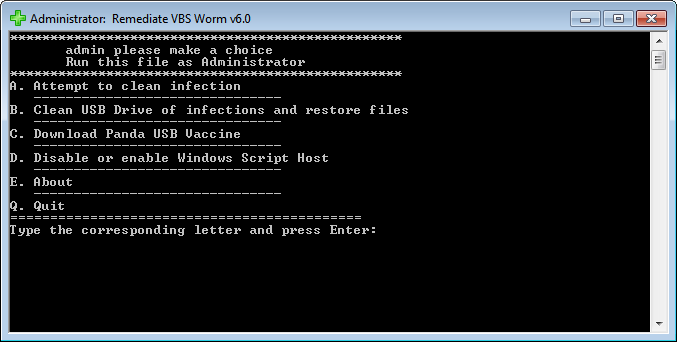 |
| Remediate VBS Worm 6.0.0 |
Instructions on using Rem-VBSworm
You should run the script in the following sequence, at least on a normal machine:
Plug in your infected USB (if any) and choose A (wait), then B (wait) and afterwards C.
After these steps, perform a full scan with your installed antivirus product or perform an online scan.
Some tips and tricks:
- Using option A, the tool will attempt to clean the infection. It will also fix any registry changes made by the malware. (for example it will re-enable Task Manager should it be disabled).
- ! When you use option B, be sure to type only the letter of your USB drive!
So if you have a USB drive named G:\, you should only type G
This option will eradicate any related malware on the USB drive, as well as unhide your files (make them visible again). - With option C you can download Panda USB Vaccine to prevent any other autorun malware entering your computer.
- With option D you have the possibility to disable or re-enable the Windows Script Host (WSH), to prevent any malware abusing it.
- I advise to end the script with Q as to ensure proper logfile closing. A logfile will open automatically, but is also created by default on the C:\ drive. (C:\Rem-VBS.log)
- When the tool is running, do not use the machine for anything else.
(it takes about 30 seconds to run) - If VBS malware is found, it will be automatically removed and a copy will be placed at C:\Rem-VBSqt.
- Accidentally used an option and want to exit the script? Use CTRL + C to stop it.
You can use this to remedy the following malware:
- Bladabindi
- Excedow
- Jenxcus
- Houdini/Dinihu
- Autorun worms
- Any other VBS (VBScript) or VBE malware
- Any other malware that abuses the WSH (Windows Script Host)
Download the tool from here:
 Rem-VBSworm
 (ZIP file)
MD5: 9373ddb48b9e71926c981c36ad8268f3
SHA1: a96c53b6c34fd448c9e5e92b88dc609345a10034
Mirror on BleepingComputer:

Instructions in other languages are also available, namely Dutch, French, German and Polish:
Entfernen VBS Worm (Deutsch) (temporary)
Remediate VBS Worm (français)
VBS malware verwijderen (Nederlands)
Infekcje z mediów przenośnych (Polish)
Changelog:
23/12/2015 - version 6.0.0:
ADDED: logging of USB device ID
CHANGED: Panda USB vaccine download (now on BleepingComputer)
IMPROVED: log output is now completely streamlined and cleaned
IMPROVED: disabling of WSH on Windows XP (option D)
IMPROVED: scanning time (option A)
IMPROVED: detection of certain autorun/VBS worms
21/10/2015 - version 5.0.0:
ADDED: logging of installed antivirus
ADDED: detection of malicious shortcut links in startup folders
ADDED: malicious VBS files now automatically copied to quarantine for research purposes (on C:\Rem-VBSqt)
IMPROVED: handling of files, resulting in a false positive rate of almost zero
IMPROVED: detection of certain malware variants using autorun to spread or hide files
(Fanny worm, Andromeda/Gamarue malware)
IMPROVED: minor code cleanup, minor log output cleanup - greater visibility
21/04/2015 - version 4.0.0.:
ADDED: removal of AutoIT autorun worms
ADDED: version number (in main window and log)
ADDED: option D will now allow you to disable or re-enable the WSH
FIXED: false negative
IMPROVED: option B will now detect if you try to execute on system drive
IMPROVED: log output is cleaned and more streamlined
03/03/2015 - versio 3.0.0.:
ADDED: more information about attached drives & system
ADDED: root contents of removable drive will now be listed
FIXED: false positive
IMPROVED: general improvements
23/04/2014 - version 2.0.0:
First public version
ADDED: detections & disinfections will now be logged
ADDED: all attached drives are now listed
FIXED: False positive on unrelated files
FIXED: Issue with Read-Only files
IMPROVED: Registry fixes
IMPROVED: Scanning time
IMPROVED: Disinfection mechanism for USB-drives
10/12/2013 - version 1.0.0:
Private use only
CREATION
Conclusion
In regards to autorun worms, you should follow these precautions:
- Install all your Windows Updates.
- Disable autorun. This should already be done by Windows Update, but if not you can use:
- Don't simply insert a USB-drive in your machine without knowing who it is from. Found a USB-drive at your parking lot? Yeah, don't even think about it. You might want to read:
Criminals push malware by 'losing' USB sticks in parking lots - You can install and run Script Defender along your antivirus/antimalware product:
Script Defender by AnalogX
This will effectively block the execution of malicious scripts like VBS, VBE, HTA, ... - If you aren't planning on ever using VBscripts at all, or you are not working on a company laptop (which may use scripts!), you can also simply disable the Windows Script Host. You can use option D in my tool.
- For companies, take a look at this as well:
Command line process auditing - Last but not least, install an Antivirus and update it regularly.
Share story!


0 nhận xét